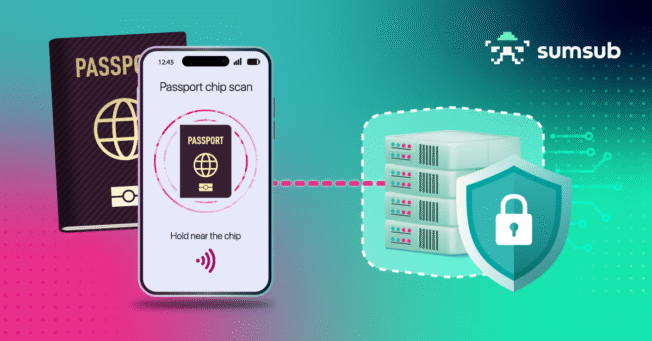
The MOBILE CHIP SDK is an extremely secure and highly reliable ID verification solution, that enables seamless reading and verification of chip data from biometric passports and ID cards according to ICAO 9303.
A robust NFC process speedily accesses and displays the data stored on an ID card or passport chip. For even faster and more convenient access to the chip, the MOBILE CHIP SDK can be seamlessly combined with the MOBILE SCAN SDK, which automatically captures the MRZ required for secure chip authentication. The MOBILE CHIP SDK is available for Android & iOS and can easily be integrated into any existing application, or modified as a standalone identity document verification app.
Reading and verifying passports and ID cards has never been more secure and trustworthy.
The MOBILE CHIP SDK can be deployed in two configurations
MOBILE CHIP SDK online and MOBILE CHIP SDK offline
MOBILE CHIP SDK online |
MOBILE CHIP SDK offline | |
| Environment | If the end-user device is not trustworthy. | If the end-user device / smartphone is managed and trustworthy. |
| Recommended Scenarios | – Remote Onboarding – Know Your Customer / Know Your Client (KYC) – Identity Verification – Identity Proofing – Customer Verification | Managed devices: Law enforcement or corporate use. |
| Connectivity | Server connection is required (on-premises, managed environments, corporate cloud environments, or public clouds such as Azure, AWS, or Google Cloud). | No server connection is required. |
| Supported RFID Chip Standards ISO 14443-3 ISO 14443-4 | ✓ ✓ | ✓ ✓ |
| Supported Applications ePassport (DG1-DG16) eID (DG1-DG21) Reading RFID chips in compliance with ICAO 9303, LSD 1.7, and PKI 1.1 data formats. | ✓ ✓ | ✓ ✓ |
| Data Access Modes Direct SAC | ✓ ✓ ✓ ✓ ✓ | ✓ ✓ ✓ ✓ ✓ |
MOBILE CHIP SDK online
The MOBILE CHIP SDK online requires a server connection on your premises and connects the chip of an eMRTD with the secure DocVal Server. This configuration delivers enhanced security through server-side verification, prevents man-in-the-middle attacks by establishing an encrypted channel between the mobile device and the backend server, ensuring that all chip verification occurs in a controlled, secure environment.
The MOBILE CHIP SDK online is particularly secure because the untrusted client device merely facilitates chip access while all verification logic remains on the trusted server side.
Components of the MOBILE CHIP SDK online
- eMRTD Connector
- Document Validation Server (as a customer-based on-premise solution)
Use Cases of the MOBILE CHIP SDK online
The MOBILE CHIP SDK online is ideal for scenarios requiring high security and regulatory compliance with untrusted client devices. Use cases include banking and financial services for KYC compliance and secure digital customer onboarding. Airlines leverage the SDK for streamlined passenger check-in processes and frequent flyer program enrollment, ensuring IATA-compliant travel data. Hotels and hospitality providers use it to speed up guest check-in while verifying identities to prevent fraud. Car rental companies benefit from rapid identity verification and fraud prevention. E-Government services utilize the technology for secure citizen identification when accessing digital administrative services.
The on premise DocVal Server’s ability to verify data integrity, confirm document authenticity, and detect cloned chips makes it particularly valuable for these regulated and security-sensitive environments.
MOBILE CHIP SDK offline
The MOBILE CHIP SDK offline is available for trusted devices and operates without requiring a server connection. This configuration integrates a lightweight SDK into the main application on the trusted device, where, unlike the online version, all verification logic is executed.
The MOBILE CHIP SDK offline enables complete on-device identity document chip verification in environments where network connectivity is unavailable or undesirable.
Components of the MOBILE CHIP SDK offline
Use Cases of the MOBILE CHIP SDK offline
The MOBILE CHIP SDK offline is primarily deployed by law enforcement agencies, border control authorities, and security organizations that operate their own managed device fleets. Typical use cases include integrators serving police forces, government security agencies, and other official organizations requiring field-based identity verification capabilities. These trusted devices enable officers and personnel to verify identity documents instantly in the field, at checkpoints, or in remote locations without depending on network connectivity.
The MOBILE CHIP SDK offline is particularly valuable for police forces conducting on-site identity checks, immigration officers processing travelers at border crossings, and security personnel requiring immediate document authentication in controlled environments.
Eager for more technical details on the MOBILE CHIP SDK?
See how the MOBILE CHIP SDK can be integrated in your solution. Get answers to your questions on the OVD Kinegram Developer Hub.
See how easy identity verification and onboarding a new customer can be in our video
kinegram.digital’s Licensing Plans
Choose the plan that fits your current needs and grows with you.
Startup & Growth
For teams taking their first product to market
Who this is for
Startups, MVPs, pilots, innovation teams and early market entry
Reasons to choose this plan
You can focus on building and validating your product, without worrying about licensing complexity or cost surprises.
Trusted Operations
For organizations that rely on identity verification every day
Who this is for
Enterprises, law enforcement, regulated environments and field operations
Available Models
Reasons to choose this plan
Fit for organizations that require reliability, predictability and clear responsibility, not experimentation.
Strategic Partnership
For businesses building identity verification at scale
Who this is for
Platform providers, white-label solutions and large-scale deployments
Available Models
Reasons to choose this plan
A collaborative commercial model designed for long-term growth, aligned incentives and shared success.
Included With Every Plan
No onboarding fee
Direct support from our product team
On-device or server-based deployment
Full data control on your side
Licensing can evolve as your needs change
Let’s find the right setup for your requirements
Whether you already have a clear direction or want guidance, we’ll help you move forward.
Try it Yourself
Start by accepting our Evaluation Agreement. We’ll get back to you within one business day and guide you through the evaluation in four easy steps:
1. Kick-off Call
A quick chat with our expert to align on your business case and technical setup. Together, we decide on the next steps.
2. Planning & Setup
Define the evaluation phase and receive your tailored software package.
3. Evaluation
Test the solution in your own environment, with our expert available to support you.
4. Next Steps
Together, we’ll explore options for long-term collaboration.
Get more information about
secure identity verification
Give us a call
Call us at
Contact by e-mail
Contact us via our contact form
Personal meeting
Arrange a personal meeting.